
In many schools, colleges, or education departments, data is everywhere: student records, assignment scores, attendance logs, lesson plans, curriculum maps, feedback forms, and more. But often that data sits in silos: spreadsheets, PDF files, or rigid systems that don’t talk to each other. Teable aims to change that.
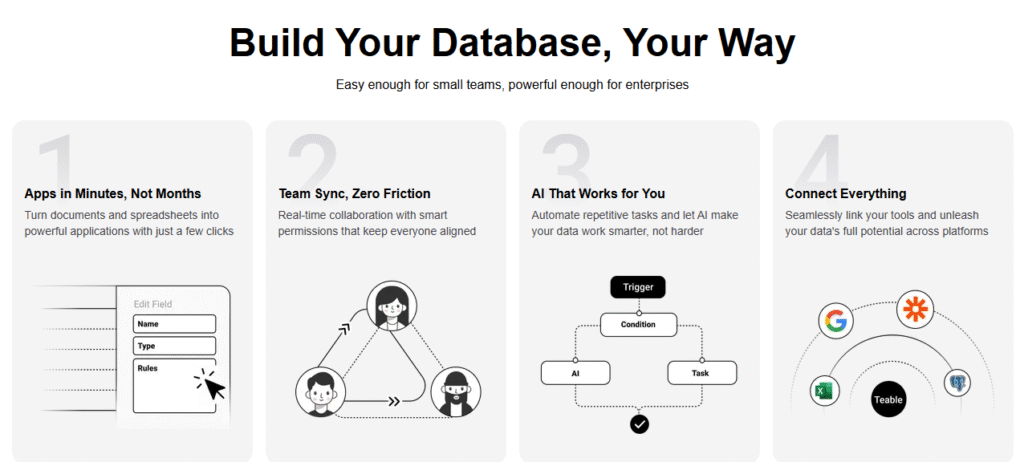
Teable is an AI-driven, no-code database platform. Its goal is to let people (not just programmers) build functional applications, derive insights, automate workflows, and work with large datasets — all without writing much code.
At its core, Teable provides:
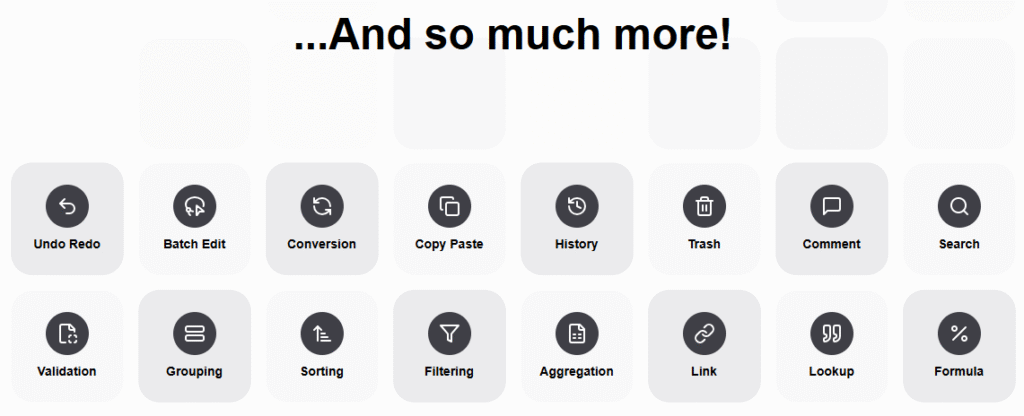
- A spreadsheet-style interface (rows, columns, tables) that is familiar and accessible.
- Multiple views (grid, form, Kanban, calendar, gallery) to interact with data in different ways.
- Automation and AI features (called “AI Action”) that allow you to generate or parse content from your table data using natural language instructions.
- Integration with various language models (OpenAI, Claude, etc.), and support for deploying self-hosted LLMs if desired.
- Scalability: it claims to handle millions of rows and maintain performance.
- Open-source roots, meaning you can self-deploy if you like, or use their hosted service.
Teable is sort of like an enhanced, smarter spreadsheet + lightweight database + AI assistant rolled into one.
How Teable Works
To see how Teable does what it does, here’s a simplified view of its workflow and features.
Tables, Bases, and Data Structure
- Teable organizes data into bases, and each base can contain tables. A table is like a spreadsheet: rows (records) and columns (fields).
- You can import tables from CSV or Excel files, or start fresh.
- Each table can have different views (grid, form, calendar, gallery, etc.) to better display or interact with data depending on context.
AI Action: Letting Natural Language Drive Data Operations
One of Teable’s standout features is AI Action. This is where you instruct the system (in natural language) to do something with the data, and the system uses AI models to execute your instruction. For example:
- You can create prompts that reference fields in your table (e.g. “Summarize the feedback comments from students in the last month”)
- You might have document or image attachments (PDFs, images, etc.), and Teable can parse text, extract relevant fields, or do content analysis.
- You choose a model (vision, reasoning, etc.), set parameters like “temperature” for how creative vs. deterministic the output should be, and decide the output format (text or structured JSON).
- You test the action, inspect results, and adjust your prompt if necessary.
So you can convert raw tables and unstructured attachments (like student submissions, feedback forms) into actionable insights or new fields without manual coding.
Automation, Workflows, and App Building
Beyond single AI actions, Teable emphasizes that you can build workflows:
- Triggered automations: e.g. when a new row is added, an action runs (send an email, classify text, update another table).
- Integrating with external tools (APIs, other databases) so Teable becomes part of a larger toolchain. (Teable supports integrations with AI models and external services.)
- Building functional app-like tools: dashboards, views, forms embedded in websites, etc. Teable aims not just to be a passive data store but something you use.
Open Source & Enterprise Options
- The core of Teable is open source: some users can self-host, extend, or review the code.
- The hosted/commercial version adds enterprise features (security, user management, scale, support) on top of the open source core.
- Because you can deploy it yourself, you have more control over data privacy and infrastructure if needed.
Potential Uses in Education
So how might Teable be helpful in a school, college, or educational department? Here are possible use cases — and practical ideas for how to start.
1. Centralized Student Data & Analytics Hub
Instead of juggling multiple spreadsheets, LMS exports, and forms, you could bring everything into Teable:
- Student profiles, grades, attendance, behavior logs, parent contacts.
- Feedback/comments from assignments, surveys or questionnaires.
- Automatically generate summary statistics (averages, deviations), alerts (e.g. low attendance), or patterns (e.g. improvement over time) via AI Action.
This gives you a unified place to see the holistic picture of students.
2. Intelligent Feedback & Grading Assistance
Imagine a table of student essay submissions or responses. With AI Action:
- You could write a prompt: “For each response, give a 2-sentence constructive feedback plus suggest one improvement area.”
- Teable can parse and generate that feedback automatically (subject to review).
- You can extract key themes from student work: common mistakes, strengths, trends.
This doesn’t replace you, but speeds up the draft feedback process.
3. Automating Administrative Tasks & Workflow
Many admin tasks are repetitive:
- When a new parent communication row is added, generate an email draft, notify stakeholders, or flag for follow-up.
- When a survey is submitted, categorize or tag comments automatically.
- Use forms embedded online (say parent or student feedback forms) that feed directly into Teable, triggering AI actions or alerts.
4. Curriculum & Resource Mapping
You could build a table of curriculum units, prerequisites, resources (textbooks, reading lists, videos, assignments). Then:
- Use AI to suggest missing resources, similar topics, or alignment with standards.
- Create dashboards that let you see which units are well-resourced or which students are weak in certain units.
- Embed this as a tool for colleagues to query (“Which units cover concept X?”) or to generate lesson plan scaffolds.
5. Research & Project Data Management
For teachers or students conducting small research or class projects:
- Use Teable to store survey responses, observations, coded qualitative notes.
- Use AI Action to help code responses, categorize themes, or summarize findings.
- Create views or dashboards to track progress, anomalies, or insights.
Things to Watch Out
While Teable is promising, here are cautions and considerations, especially in teaching settings:
- Quality & Oversight: AI-generated feedback or classifications may make mistakes. Always review before sharing with students.
- Prompt Design & Tuning: Getting good results from AI requires skill in writing prompts and refining them. There is a learning curve.
- Data Privacy & Permissions: Student data is sensitive. Ensure permissions, access control, and privacy are handled appropriately.
- Scalability & Performance: While Teable claims to scale, very large data and complex workflows might push system limits or require optimizations.
- Dependence on AI models: If external AI APIs change, degrade, or are unavailable, some Teable features may be impacted.
- Adoption & Training: Teachers and staff would need training to use the tool well. The change from spreadsheets or legacy systems can be nontrivial.
Tips for Educators-How to Begin Using Teable
If you’re curious and want to try Teable in your teaching context, here’s a step-by-step path:
- Pick a pilot project
Choose a manageable domain — maybe feedback processing, parent communications, or a curriculum mapping table. - Import some data
Bring in an existing spreadsheet or CSV (attendance, grades, student details, survey responses) into a Teable base and table. - Create views you need
Switch between grid, form, calendar, or gallery to explore which view is most useful for your task. - Experiment with AI Action
Try a simple prompt (e.g. “Summarize the comments in this table by theme”). Review output & iterate prompt. - Set up a workflow or automation
E.g. when a new row is added, trigger an AI Action (draft email, classification). See how it streamlines work. - Share & collaborate
Invite colleagues (if allowed) to view or collaborate. Let them test and give feedback. - Evaluate & expand
See what worked, what didn’t. Refine prompts, expand to other areas (assessment, resource mapping, etc.).
Teable is a powerful tool that blends the familiarity of spreadsheets with the intelligence of AI and the structure of databases. For educators, it offers a promising way to:
- Reduce manual work (feedback, data summarization)
- Bring multiple data sources under one roof
- Automate workflows and administrative chores
- Enable more responsive, data-informed actions
But as always with AI tools, the key is human in the loop — review outputs, refine prompts, and ensure ethical, privacy-aware usage.
