
If you’ve worked with AI tools or chatbots lately, you’ve probably heard one common piece of advice:
“Structure your prompts.”
But how do you structure them? And how do you do it without writing huge blocks of JSON or confusing the AI?
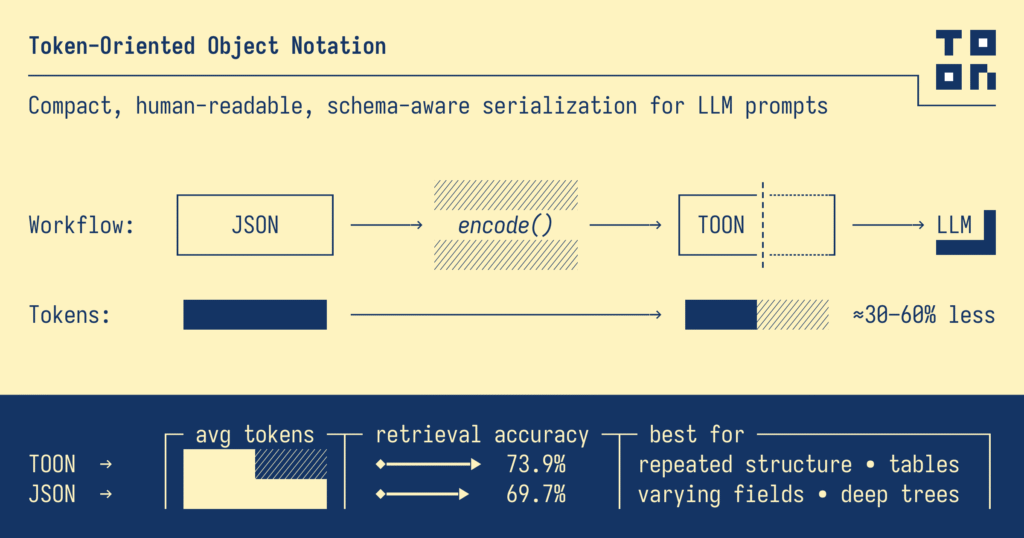
That’s where TOON (Token-Oriented Object Notation) comes in.
Think of TOON as a neat, clean, and lightweight way of giving structured data to an AI system—without making your prompt look like a college assignment full of curly braces, quotes, and commas.
Let’s explore what TOON is, why it helps, and—most importantly—how you can use it in your prompts, even if you’re completely new to structured data.
What is TOON (in simple words)?
TOON is a compact format for sending data to AI models.
You can think of it as a friendly middle ground between:
- JSON (structured but bulky)
- CSV (compact but not descriptive)
- YAML (clean but inconsistent for AI)
TOON takes the best parts of all three:
- Clean like YAML
- Small like CSV
- Structured like JSON
And it’s designed specifically for AI prompting.
Why Should You Use TOON in Prompts?
Here are three reasons (explained simply):
1. TOON saves tokens — and tokens = money
AI models count every single character you send.
JSON wastes tokens because it repeats keys:
{
  "users": [
    { "id": 1, "name": "Alice", "role": "admin" },
    { "id": 2, "name": "Bob", "role": "user" }
  ]
}
TOON uses far fewer:
users[2]{id,name,role}:
  1,Alice,admin
  2,Bob,user
Less clutter → fewer tokens → cheaper prompts.
2. AI models understand TOON surprisingly well
AI reads TOON like a clean table.
It knows:
- how many rows there are
- what each column means
- where each value goes
When the data is clear, the AI’s answer is clearer too.
3. TOON makes prompts easier to write and maintain
If you build chatbots, agents, or automations,
your prompts become easier to update:
- Add new rows? Easy.
- Add fields? Easy.
- No more JSON syntax errors.
When Should You Use TOON?
Use TOON when:
✔ You have lists, tables, or rows of repeated items
✔ You want the AI to analyze, summarize, filter, or compare data
✔ You want to save tokens
✔ You want your prompts to look clean and readable
Avoid TOON when the data is deeply nested or highly irregular—but honestly, for most real cases, TOON works beautifully.
How to Prompt Using TOON (Step-by-Step)
Let’s walk through prompting with TOON using a real example.
Imagine you want an AI to analyze product sales.
Step 1: Write your TOON data
Here’s how the dataset looks in TOON:
sales[4]{product,units,price}:
  Phone,22,12000
  Charger,40,800
  Cable,18,300
  Laptop,5,65000
It’s clean, right? No braces. No quotes. No confusion.
Step 2: Add your instruction
Tell the AI what you want it to do.
Example:
Task:
1. Find the total revenue.
2. List products with more than 20 units sold.
3. Give the output as plain English.
Step 3: Combine instruction + TOON
Your final prompt becomes:
Here is sales data in TOON format:

sales[4]{product,units,price}:
  Phone,22,12000
  Charger,40,800
  Cable,18,300
  Laptop,5,65000

Task:
1. Calculate total revenue.
2. List products with more than 20 units sold.
3. Respond in simple English.
This is a perfect TOON-style prompt.
It’s clear for the human.
It’s clear for the AI.
And it saves a ton of tokens.
What Makes a Good TOON Prompt?
Here are some simple tips:
✔ Keep field names consistent
Avoid switching between unit and units.
✔ Use simple field names
Shorter = fewer tokens.
✔ Put the task after the data
AI models read best from context → instruction.
✔ Use arrays for repeated structures
Anything row-like works great in TOON.
✔ Don’t overthink it
If it looks clean and understandable, AI will understand it too.
More Example TOON Prompts
Student Marks
marks[3]{name,subject,score}:
  Rohan,Math,78
  Aditi,Science,88
  Kiran,English,65

Task:
Identify the highest scorer.
Attendance Tracker
attendance[5]{date,present}:
  2025-05-11,yes
  2025-05-12,no
  2025-05-13,yes
  2025-05-14,no
  2025-05-15,yes

Task:
Calculate attendance percentage.
Inventory Check
stock[4]{item,qty,threshold}:
Pen,40,10
Notebook,5,10
Bag,12,5
Bottle,6,6
Task:
List items that need restocking.
TOON is one of those tools that feels small but makes a huge difference—especially when working with AI models.
It:
- cleans up your prompts
- reduces token costs
- improves AI accuracy
- makes structured data easy—even for beginners
Accuracy across 4 LLMs on 209 data retrieval questions:
claude-haiku-4-5-20251001
→ TOON ████████████░░░░░░░░ 59.8% (125/209)
JSON ███████████░░░░░░░░░ 57.4% (120/209)
YAML ███████████░░░░░░░░░ 56.0% (117/209)
XML ███████████░░░░░░░░░ 55.5% (116/209)
JSON compact ███████████░░░░░░░░░ 55.0% (115/209)
CSV ██████████░░░░░░░░░░ 50.5% (55/109)
gemini-2.5-flash
→ TOON ██████████████████░░ 87.6% (183/209)
CSV █████████████████░░░ 86.2% (94/109)
JSON compact ████████████████░░░░ 82.3% (172/209)
YAML ████████████████░░░░ 79.4% (166/209)
XML ████████████████░░░░ 79.4% (166/209)
JSON ███████████████░░░░░ 77.0% (161/209)
gpt-5-nano
→ TOON ██████████████████░░ 90.9% (190/209)
JSON compact ██████████████████░░ 90.9% (190/209)
JSON ██████████████████░░ 89.0% (186/209)
CSV ██████████████████░░ 89.0% (97/109)
YAML █████████████████░░░ 87.1% (182/209)
XML ████████████████░░░░ 80.9% (169/209)
grok-4-fast-non-reasoning
→ TOON ███████████░░░░░░░░░ 57.4% (120/209)
JSON ███████████░░░░░░░░░ 55.5% (116/209)
JSON compact ███████████░░░░░░░░░ 54.5% (114/209)
YAML ███████████░░░░░░░░░ 53.6% (112/209)
XML ███████████░░░░░░░░░ 52.6% (110/209)
CSV ██████████░░░░░░░░░░ 52.3% (57/109)
